Add crypto to your checkout and the first coin customers ask for is often not Bitcoin. It is USDT, the dollar-pegged stablecoin issued by Tether. Buyers like it because its value doesn't swing between the moment they pay and the moment you receive it, and merchants like it for exactly the same reason. If you want to accept USDT payments, you are choosing the crypto that behaves most like money.
USDT has one trap that catches almost every new merchant: the same token lives on several blockchains at once. This guide explains how the TRC20, ERC20 and BEP20 versions differ, how to design a checkout that prevents wrong-network payments, and how to accept USDT without checking wallets by hand.
Why accept USDT payments?
- Stable value. One USDT is designed to track one US dollar, so a $120 order is still worth about $120 when it arrives.
- Global reach. Many buyers in regions where cards are declined, expensive or simply unavailable already hold USDT on an exchange or in a wallet.
- No chargebacks. A confirmed on-chain transfer can't be pulled back by the payer.
- Fast settlement. On the networks most customers use, a payment confirms in seconds to minutes, not days.
- Simple pricing. Prices stay in dollars or your own currency, with no volatile coin rate for customers to second-guess.
There are honest caveats. A stablecoin is only as stable as its issuer and its reserves, and USDT is a centralised token whose issuer can freeze specific addresses, for example at the request of law enforcement. For most merchants these are reasons to move received funds on a regular schedule, not reasons to avoid USDT. If crypto checkout is new to you, start with what a crypto POS system is.
TRC20 vs ERC20 vs BEP20: how USDT networks differ
USDT is issued on several blockchains, and each version is a separate token that only moves on its own chain. The names come from token standards: TRC20 on Tron, ERC20 on Ethereum and BEP20 on BNB Smart Chain. All three are worth one dollar, but they behave differently in the details that matter at checkout.
| TRC20 | ERC20 | BEP20 | |
|---|---|---|---|
| Blockchain | Tron | Ethereum | BNB Smart Chain |
| Fees paid in | TRX, as energy and bandwidth | ETH, as gas | BNB, as gas |
| Address format | Starts with T | Starts with 0x | Starts with 0x |
| What drives the fee | Whether the sender has energy | Ethereum demand | Gas price, usually low |
| Token issued by | Tether | Tether | Binance-Peg, backed by USDT |
| Common with | Exchange withdrawals and transfers | Ethereum wallets and DeFi users | Binance and BNB Chain users |
USDT on Tron (TRC20)
Tron carries a large share of everyday USDT transfers, and most major exchanges offer it as a withdrawal option. Fees on Tron are paid in energy and bandwidth, which senders get either by staking TRX or by burning a little TRX per transaction. A customer who holds USDT but no TRX often can't send at all, which is a common reason a TRC20 payment never starts.
USDT on Ethereum (ERC20)
ERC20 USDT is the version most Ethereum wallets, hardware wallets and DeFi users hold. Gas is paid in ETH, and the cost of a transfer rises when the network is busy. Ethereum adds a block roughly every twelve seconds, so confirmations arrive quickly once a transaction has been included.
USDT on BNB Smart Chain (BEP20)
BEP20 is popular with customers who trade on Binance or already use BNB Chain wallets, and its fees, paid in BNB, are usually low. One detail is worth knowing: the USDT on BNB Smart Chain is a Binance-Peg token, backed by USDT that Binance holds, rather than a token Tether issues on that chain directly. For most merchants it behaves the same way; if your treasury policy cares about the issuer, note which version you hold.
There is no single best network. The right one is whichever your customer's wallet or exchange already supports, which is why a good checkout lets the customer choose instead of forcing one on them.
The wrong-network problem, and how to prevent it
A USDT payment is only correct if three things match: the amount, the address and the network. The first two are obvious to customers. The third isn't, and it causes most of the "I paid but nothing happened" messages merchants receive.
The trap is the address format. Ethereum and BNB Smart Chain both use addresses that start with 0x, and an address on one is a valid address on the other. If your invoice is watching for ERC20 USDT and the customer withdraws from an exchange over BEP20 to the same 0x address, the transfer succeeds, on a chain the invoice isn't watching. The funds exist; they are simply somewhere else, and whether they can be recovered depends on who controls that address's private key on the other chain.
Tron addresses start with T, so most wallets refuse to send TRC20 USDT to a 0x address, and the other way round. Customers still pick the wrong option in exchange withdrawal menus, though, so no network is immune.
Address-only checkout
- "Send 120 USDT to this address"
- Customer guesses the network
- A 0x address works on two chains
- Payment lands where nobody looks
Network-first checkout
- Customer picks the network first
- "Pay 120.00 USDT on Tron (TRC20)"
- Address issued for that chain only
- Expiry timer and live status
How to accept USDT payments, step by step
- 01
Choose where customers will pay
Decide whether USDT appears on your storefront checkout, on payment links you send in chat, or in a checkout widget on your own website. Ideally all three use the same invoices underneath.
- 02
Enable USDT and the networks your buyers use
Turn on USDT in your payment settings, with the networks your customers actually hold. Native coins such as BTC or LTC always use their own chain; stablecoins need a network choice.
- 03
Keep prices in your own currency
When a customer picks USDT, the invoice converts the price, fixes the amount and starts an expiry timer. Show the amount with two decimals and the network beside it.
- 04
Use one invoice per order
A separate invoice for each order lets the payment be matched automatically. A single address posted in a channel can't tell you who paid what.
- 05
Let confirmations do their job
Once the payment is detected, the invoice waits for the network's confirmation threshold before it completes. Show the progress so the customer knows it's working.
- 06
Handle short payments and deliver automatically
Some exchanges deduct their withdrawal fee from the amount sent. A partial state lets the customer top up the same invoice. When the invoice completes, deliver the key, file or access straight away.
Confirmations, short payments and gas: the operational details
- Confirmations. Tron and BNB Smart Chain produce blocks every few seconds and Ethereum roughly every twelve, so USDT payments usually complete quickly once sent. When customers wait, it is more often their exchange processing the withdrawal than the blockchain.
- Short payments. A payment that arrives a few cents short is usually the sender's exchange taking its fee from the amount. Treat it as a partial payment, not an error.
- Gas for later. To move USDT out of your wallet you need the chain's own coin: TRX on Tron, ETH on Ethereum, BNB on BNB Smart Chain. Keep a small amount of each for the networks you accept.
- Overpayments and duplicates. Customers occasionally pay twice. Fulfil once and refund the excess on the same network.
- Refund addresses. Exchange deposit addresses can be shared or rotated, so ask the customer for a refund address on the correct network rather than sending back to where the payment came from.
Common USDT payment mistakes
- Posting one wallet address in a Discord channel. You can't match payments to buyers, and you can't tell which network they used.
- Writing "USDT" without a network. Every instruction needs both: "120.00 USDT on Tron (TRC20)".
- Delivering on first sight of a transaction. Wait for the confirmation threshold, even for a stablecoin.
- Forgetting the gas token. You will need TRX, ETH or BNB to move your USDT later.
- Treating USDC as interchangeable. USDC is a different stablecoin from a different issuer. Offer it as its own option, with the same network-first rules.
- Keeping USDT out of your reporting. Stablecoin revenue is still revenue. Record it in the same order history as card sales.
Accepting USDT with PapelShip
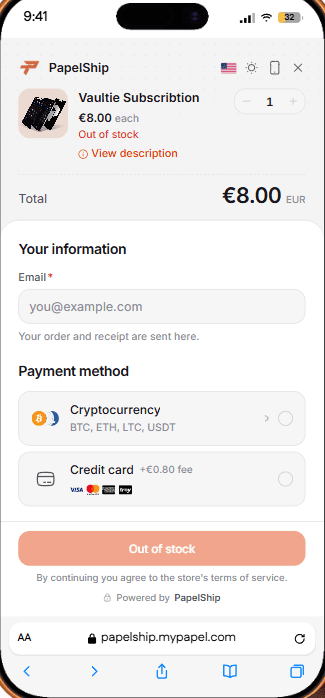
On PapelShip, USDT is part of Crypto POS, which is included from the Free plan. Customers pay through the checkout's crypto payment card, with a QR code, copy actions for the address and amount and a live payment status, and each payment is sent directly to your own wallet with no intermediary holding the funds.
- One invoice per order, with an expiry timer you set in the invoice builder.
- A live tracker on each invoice showing the payment address, the confirmations and the transaction itself.
- Delivery on confirmation. Keys, files and Discord roles are released once the blockchain confirms the payment, and each delivery is linked to its payment record.
- The same records as cards. USDT orders sit in the same order history as card and bank payments, so you report on one set of numbers.
- 0% fees on PapelShip+. At €14.99 a month, PapelShip+ brings crypto fees to 0%. Network fees are set by the blockchain, and the fees for Free and Vaultie are on the pricing page.
To see what happens behind the payment card, from quote to settled funds, read crypto payment processing, from checkout to settlement.
Gyakran ismételt kérdések
Make USDT the easy way to pay
USDT is the simplest way to give international customers a stable, card-free way to pay. With the network chosen first, an exact amount, automatic confirmations and instant delivery, it is as hands-off as a card payment, and a confirmed payment can't be charged back.
Pair it with cards in one checkout and almost every buyer has a way to pay.
PapelShip fizetési csapat
Pénztár, kripto és kifizetések