A customer is ready to pay, but not with a card. They want to send USDT from a phone wallet, or settle a larger order in Bitcoin without a bank in the middle. A crypto POS system is what lets a business accept that payment without turning checkout into a manual routine of copying addresses, refreshing block explorers and guessing whether the right amount arrived.
This guide explains what a crypto POS system is, how a payment moves from checkout to a confirmed order, how it differs from a card terminal, who actually holds the money, and the features and mistakes that matter most when you choose one.
What is a crypto POS system?
A crypto POS (point-of-sale) system is software that accepts cryptocurrency at checkout and turns an on-chain transfer into an order you can track, fulfil, refund and report on. It sits between your customer, the blockchain and your back office, and it does four jobs.
- Quoting. It converts your price, say $249, into an exact amount of the coin the customer chose, and keeps that quote valid for a limited window.
- Addressing. It gives each order its own invoice and payment details, so every transfer can be matched to the right customer without guesswork.
- Verification. It watches the blockchain until the payment has enough confirmations to be treated as final.
- Recording. It writes the result next to your card and bank sales, so the payment is reportable, refundable and auditable.
"POS" no longer means only a terminal on a counter. For most online businesses the point of sale is a hosted checkout, a payment link sent in a chat, or a checkout embedded in their own site. A good crypto POS serves all of these from one set of records, and some businesses also use it in person, with the customer scanning a QR code at the till.
How a crypto POS payment works, step by step
Every crypto checkout follows roughly the same lifecycle. Once you know it, judging a provider becomes much easier, because you can ask exactly how it handles each step.
- 01
The order creates an invoice
When the customer picks crypto, the system creates an invoice tied to the order. It stores the price in your currency, the chosen coin and network, a payment address and an expiry time.
- 02
The price is converted and the amount is fixed
Crypto prices move constantly. The invoice converts your price at the current rate and shows the exact amount to send, valid until the invoice expires, so a price swing during checkout doesn't leave you short.
- 03
The customer pays from their wallet
They scan a QR code or copy the address and amount. For stablecoins such as USDT they also need the right network, because the same token exists on several blockchains.
- 04
The blockchain is watched
The system detects the incoming transaction and matches it to the invoice. At this point the payment has been seen, but it isn't final yet.
- 05
Confirmations make it final
Each new block built on top of the transaction is a confirmation. Once the threshold for that coin is reached, the invoice is marked complete.
- 06
The order is fulfilled and recorded
The product is released: a license key, a download or an activated subscription. Your systems are notified, and the payment appears in your dashboard with every other sale.
Because a blockchain payment isn't instant, a crypto invoice has more states than a card payment. Providers name them differently, but these are the ones you should expect to see, and each should map to a single action.
| Invoice state | What it means | What you do |
|---|---|---|
| Awaiting payment | Invoice created, nothing received | Nothing yet |
| Detected or confirming | Transaction seen, not yet final | Wait. Don't deliver |
| Partially paid | Less than the full amount arrived | Customer tops up the same invoice |
| Needs review | Late, unusual or overpaid payment | Check it and decide |
| Completed | Paid in full and confirmed | Fulfil the order |
| Expired | The quote window closed unpaid | Issue a new invoice if needed |
Crypto POS vs card POS: what actually changes
Card and crypto payments solve the same problem in very different ways. A card payment is authorised in a moment and settled days later through a chain of banks and networks, and the payer can dispute it long after the sale. A crypto payment is a transfer the customer sends themselves: it takes a little longer to become final, but once it is final, it stays final.
| Card POS | Crypto POS | |
|---|---|---|
| Who can pay | Customers with an accepted card | Anyone with a supported wallet |
| Finality | Authorised now, settled later | Final after enough confirmations |
| Chargebacks | Possible after the sale | A confirmed transfer can't be reversed by the payer |
| Refunds | Pushed back to the card | Sent as a new transfer |
| Main risks | Stolen cards and disputes | Price movement, wrong-network payments |
Neither replaces the other. Crypto reaches buyers whose cards are declined or who simply prefer to pay from a wallet, and it removes chargeback risk on confirmed payments. Cards remain the most familiar option for everyone else. Most businesses that add crypto keep cards, and the practical question becomes how to run both in one checkout.
No chargebacks doesn't mean no risk. Stolen-card fraud largely disappears with crypto, but abuse such as resold keys, shared accounts and refund requests still needs the same care as any other fraud on digital goods.
Who holds the money? Custodial and non-custodial crypto POS
This is the first question to ask any provider, because it decides who can move, delay or freeze your revenue. There are two broad models.
- Custodial. Payments land in an account the processor controls, and you request a withdrawal. It is simple to start, but the provider can delay, limit or freeze your balance, and your funds are exposed to the provider's own problems.
- Non-custodial. Payments go straight to a wallet you control. No intermediary sits between the customer's transfer and your balance, and in exchange you become responsible for securing that wallet.
Custodial processor
- Funds held in the provider's account
- Withdrawals on the provider's terms
- Balance can be frozen or limited
- Exposed to the provider's failures
Paid directly to your wallet
- Customer pays your wallet directly
- No intermediary holds the funds
- You decide when to move money
- You secure the wallet and its keys
PapelShip Crypto POS uses the second model. Each payment is sent directly to your own wallet, with no intermediary holding the funds, and the dashboard shows incoming payments, transaction histories and wallet balances. The split of responsibility is explicit: PapelShip secures the storefront checkout, the order records and the payment notifications, and you secure your wallet and its private keys.
Features to look for in a crypto POS system
Most providers can show a QR code. The differences appear in the details that decide whether payments complete on their own or turn into support tickets.
- Coin and network coverage. Customers decide what they pay with. At minimum you want Bitcoin, Ethereum, Litecoin and the main stablecoins, USDT and USDC, on the networks people actually use.
- Fixed quotes with a visible expiry. Without a timer you either absorb price movement yourself or chase customers for small differences.
- Partial-payment handling. Some wallets and exchanges deduct their fee from the amount sent. A good system records what arrived and lets the customer top up the same invoice instead of starting again.
- Reliable confirmation tracking. The invoice should move from detected to completed by itself, with the confirmation count visible to you and the customer.
- Every sales channel. Hosted checkout, payment links, an embeddable checkout widget and an API for custom flows, all writing to the same records.
- Automatic fulfilment. Delivery should start when the invoice completes, not when someone happens to notice the payment.
- Clear records and refunds. Every refund should be tied to its original order, so your books match the blockchain.
- Transparent fees. Compare the platform fee, any markup on conversion or withdrawal, and how network fees are handled.
If you sell software or access to a community, add one more test: how directly the payment connects to what you sell. A crypto payment that has to be bridged by hand to a license system or a Discord server is a payment that will, one day, be delivered late.
Common mistakes when accepting crypto payments
- One wallet address for every customer. You lose the ability to tell which payment belongs to which order. Use a separate invoice per order.
- Delivering on zero confirmations. An unconfirmed transaction can still be dropped or replaced. Wait for the threshold before you release anything valuable.
- Hiding the network. If a token exists on several chains, show the network next to the amount and accept only the one the invoice was created for. Our guide to accepting USDT payments covers this in detail.
- Quotes without an expiry. An open-ended quote lets a customer pay yesterday's price today.
- Screenshots as proof of payment. A screenshot of a wallet app proves nothing. The blockchain does, and your system should read it for you.
- Crypto revenue in a separate spreadsheet. It will eventually stop matching. Reconcile crypto in the same place as card sales.
How PapelShip Crypto POS works
PapelShip combines the pieces above in one platform, next to the storefront, card checkout and license delivery it already runs. Crypto checkout is included on the Free plan, and the same invoices sit behind every place you sell.
Storefront
Checkout on your own domain
Checkout widget
Embedded on any website
Payment links
Shared in chat or email
In store
Crypto at the counter via POS APIs
API and webhooks
Custom flows in your own software
Your wallet
Paid directly, no intermediary
- Coins. Bitcoin, Ethereum, Litecoin, Solana, BNB, Bitcoin Cash, Dash and the USDT and USDC stablecoins.
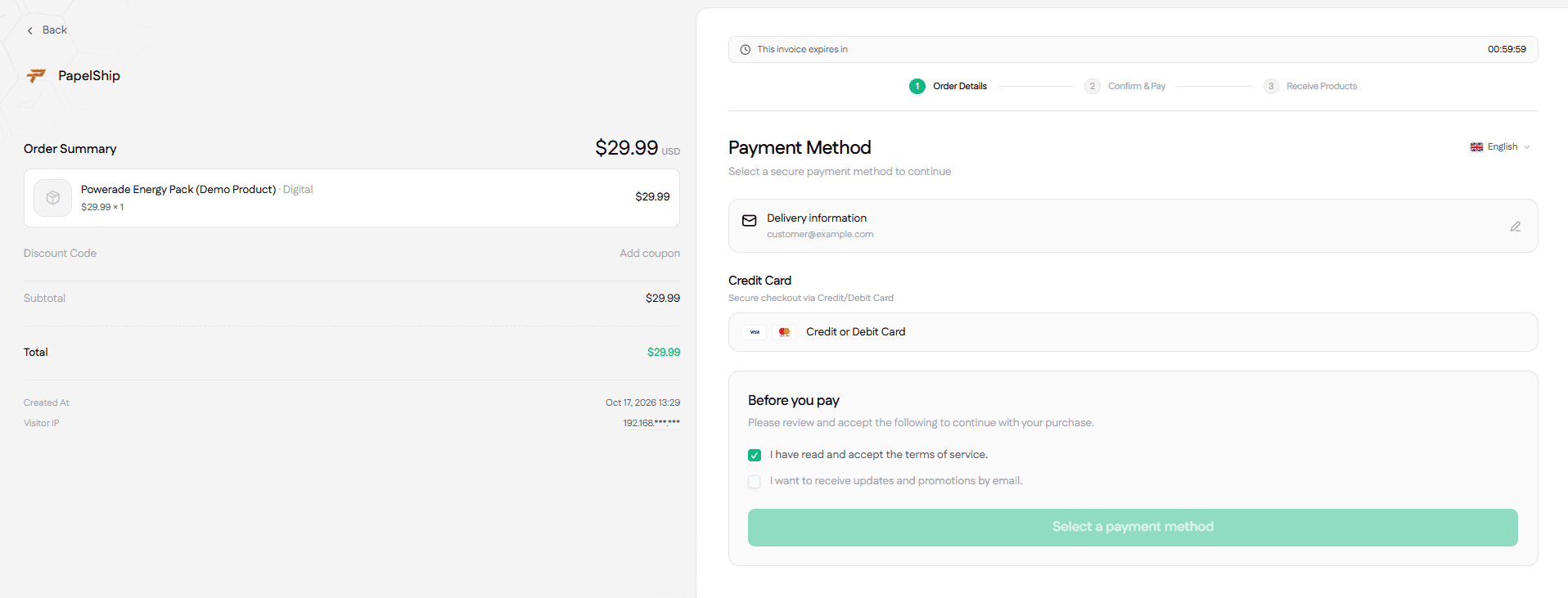
- The payment card. The checkout shows a crypto payment card with a QR code, copy actions for the address and amount, and a live payment status, so the customer can watch the payment being picked up.
- The invoice tracker. Each invoice shows the payment address, the confirmation count and the transaction itself. The invoice builder lets you set an expiry timer and choose which payment methods appear.
- Delivery on confirmation. Digital orders are delivered once the blockchain confirms the payment, and each delivery is linked to its payment record. For software, that means a qPapel Auth license key generated and delivered with no webhook bridge between separate tools.
- Alerts. Blockchain payment confirmations reach you as they happen.
- Plans. The Free plan costs €0, Vaultie is €5.99 a month, and PapelShip+ is €14.99 a month, which brings crypto and card fees to 0%. The crypto fee for each plan is listed on the pricing page.
For developers, the same invoices are available through the API; the crypto POS API integration guide shows how to wire them into your backend. To follow a single payment through every stage, read crypto payment processing, from checkout to settlement.
Veelgestelde vragen
Start accepting crypto payments
A crypto POS system turns a blockchain transfer into an order you can trust, track and fulfil automatically. If you sell software, digital products or services to a global audience, it is one of the most direct ways to reach the customers that cards miss.
Start on the Free plan, add crypto next to your existing card gateway, and move to PapelShip+ at €14.99 a month when you want 0% crypto and card fees.
PapelShip-betalingsteam
Checkout, crypto en uitbetalingen