Every payment method you leave out is a group of customers who can't buy from you. Cards cover most buyers in some countries and far fewer in others. Crypto reaches people that banks serve poorly. Bank transfer is still the default for larger business orders. The checkouts that convert best don't pick one: they accept card and crypto payments side by side and let the customer decide.
This guide covers why a single checkout beats a patchwork of payment tools, which methods to offer, how cards and crypto differ once the money moves, how to design the payment step, and how to keep risk, refunds and reporting in one place.
Why one checkout beats several payment tools
Many sellers end up with a patchwork: a card payment link from one provider, a wallet address pasted into a chat for crypto, and bank details sent by email. It works until it doesn't. Orders live in three systems, refunds are tracked in a spreadsheet, and nobody can say what last month's revenue really was.
A patchwork of tools
- Card link, wallet address, bank email
- Orders spread across three places
- Delivery done by hand per method
- Refunds tracked in a spreadsheet
One checkout
- Every method on the same screen
- One order record per sale
- The same automatic delivery for all
- One history for payments and refunds
A single checkout also converts better for a simple reason. A customer whose card is declined sees crypto or a bank transfer on the same screen, instead of leaving to find another way to pay. It is the same customer, still on your page, with a second option one tap away.
There is an operational win too. When every method feeds the same order, delivery can be automated once. A license key, a download or a Discord role is released the same way whether the money came from a card, a wallet or a bank, and support can answer "where is my order?" from one screen.
Which payment methods to offer
Start from your buyers, not from a list of every method that exists. Where are they, what do they buy, and how much does a typical order cost? A software tool sold worldwide for a modest price needs cards and crypto above all. A high-value B2B order may need bank transfer. A store with a strong local audience may need that country's own payment methods more than anything else.
Cards
Stripe, PayTR, iyzico, Shopier
Crypto
BTC, ETH, USDT, USDC and more
Bank transfer
Instructions and a reference
Local methods
Instant bank account transfers
Gift cards
Brands you choose to accept
Custom method
Your own payment process
Cards through your own gateway
Card payments run through a payment gateway connected to your account. PapelShip works with gateways such as Stripe, PayTR, iyzico and Shopier, and local Virtual POS gateways can be linked through your own API keys, so you can use the provider that fits your country and business. Card funds settle through that gateway account, under its terms.
Crypto
Crypto opens your store to buyers worldwide without a card. PapelShip Crypto POS accepts Bitcoin, Ethereum, Litecoin, Solana, BNB, Bitcoin Cash, Dash and the USDT and USDC stablecoins, and each payment is sent directly to your own wallet with no intermediary holding the funds. Stablecoins need a network as well as an amount, which is covered in how to accept USDT payments.
Bank transfer and local methods
For larger orders and business buyers, bank transfer remains common. With PapelShip's custom payment methods, the customer sees your bank details, your instructions and a reference number, generated automatically or fixed, and you can require proof of payment. Instant IBAN transfers to a bank account can be detected and approved automatically. The details are in bank transfer and gift card payments.
Gift cards and custom methods
If you accept gift cards from particular brands, or a process of your own, a custom method lets you define it: customer input fields, payment proof, instructions and notes. Each method can be limited to specific countries, detected from the buyer's IP address, or made available globally.
Card vs crypto payments: how they differ behind the checkout
On screen, card and crypto are two buttons. Behind the screen they behave very differently, and your rules for each should reflect that.
| Card | Crypto | |
|---|---|---|
| Approval | Instant authorisation | After the required confirmations |
| Chargebacks | Possible after the sale | Not possible on confirmed transfers |
| Who can pay | Customers with an accepted card | Anyone with a supported wallet |
| Settlement | On your gateway's payout schedule | Directly to your own wallet |
| Refunds | Back through the gateway | A new transfer to the customer |
| Main risks | Stolen cards and disputes | Wrong network, short payments |
Neither is strictly better. Cards win on familiarity; crypto wins on reach and finality. Offering both lets every customer use the one that works for them, and lets you apply the right rules to each: stricter fraud checks where chargebacks are possible, clear network instructions where they aren't.
How to design a checkout that accepts card and crypto
- Show methods as clear choices, with recognisable names and logos, not a long dropdown.
- Order them for your audience. If most buyers pay by card, put card first; if your community is crypto-native, lead with crypto.
- Hide what doesn't fit. A low-priced item may not need bank transfer at all, and some methods only make sense in certain countries.
- Keep the price in one currency, and convert inside the crypto step, so customers compare like with like.
- Explain the wait. Card payments are approved instantly; crypto needs confirmations. A live status on the crypto step stops customers paying twice.
- Confirm the outcome the same way, on screen and by email, whatever the method.
More methods isn't automatically better. Every extra button is one more decision for the customer, and one more thing to support. Three to five well-chosen options, shown in the right order for the buyer's country, usually beat a wall of logos.
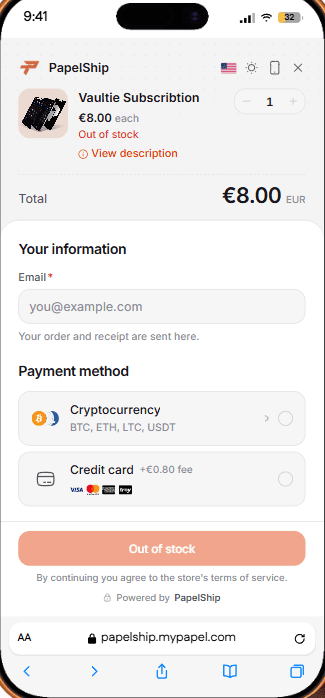
The PapelShip checkout follows this pattern: a clean order summary, a raised payment panel and a language picker, with a crypto payment card that shows a QR code, copy actions and a live payment status. Visitors can browse your store in their own language and see prices in their own currency, which matters as much for conversion as the list of methods. Selling in every language explains how that works.
If you would rather describe the setup than click through settings, PapelAI Copilot can make changes to your store and dashboard with your approval. See build your store with PapelAI.
Fraud checks, fees and rules per payment method
One checkout doesn't mean one rulebook. Each method carries different risks, and the controls should follow the method, the product and the buyer.
- Invoice fraud analysis. PapelShip checks the connection behind each invoice for proxy, VPN and TOR use, hosting and data centre networks, mobile networks, anonymity, abuse risk and iCloud Private Relay, and shows an overall risk level with each check marked clean, detected or flagged.
- Product security rules. Block VPN and proxy connections for a product, or limit how many times one customer can buy it.
- Fees per method. Payment method fees can be set per store, product or variant, so a method with a higher processing cost can carry its own fee.
- Availability by country. Custom methods can be offered only in the countries you choose, or globally.
- Visibility on invoices. The invoice builder controls which payment methods an invoice shows.
For the wider picture, from resold keys to refund abuse, see fraud prevention for digital goods.
Where your combined checkout can live
The same set of payment methods is available wherever you sell, so customers see the same choices and you get the same records.
- Your PapelShip storefront, on your own domain, with invoice pages, invoice emails and PDFs on that domain too.
- The embedded checkout widget on any website, added with one line of code. See add a checkout widget to your website.
- Payment links you share in chat, email or a community.
- WordPress and XenForo plugins for sites already built on those platforms.
- The API, for orders created in your own software.
Refunds and reporting across payment methods
Refunds follow the original method. Card refunds go back through the gateway, and crypto refunds are sent as a new transfer from your wallet, to an address the customer gives you on the network they paid on. Bank transfers are returned by bank transfer. What matters is that every refund is recorded against the original order, so your revenue figures stay correct whichever rail the money used.
- Record the method on every order, so you can see which methods your buyers actually use and drop the ones nobody chooses.
- Reconcile card sales with your gateway's reports, because card funds settle on the gateway's schedule, not at the moment of sale.
- Reconcile crypto with transaction hashes, which let anyone verify a payment on a block explorer.
- Keep refunds on the original order, with a clear state: not refunded, partly refunded or fully refunded.
PapelShip tracks every transaction, payout and refund in one view, and paid orders trigger delivery and appear in the same order history whichever method was used. The Customers page adds the other half of the picture: every buyer, with their spend and orders, regardless of how they paid.
Domande frequenti
Give every customer a way to pay
A checkout that accepts card and crypto side by side reaches more buyers and gives you cleaner books. Connect your card gateway, turn on crypto, add the bank or local methods your buyers expect, and let one order record carry every sale.
PapelShip Commerce starts on the Free plan, and PapelShip+ at €14.99 a month brings crypto and card fees to 0%.
Team Pagamenti di PapelShip
Checkout, crypto e pagamenti ai venditori