Crypto payments
How to Accept USDT Payments: TRC20, ERC20 & BEP20 (2026 Guide)
The complete merchant guide to accepting USDT payments. TRC20 vs ERC20 vs BEP20 explained, how to prevent wrong-network losses, and how to keep 100% with PapelShip+ 0% fees.
If you add crypto to your checkout, the first coin customers will ask for is usually not Bitcoin. It is USDT, the dollar-pegged stablecoin issued by Tether. Customers like it because the value does not swing between the moment they pay and the moment you receive it. Merchants like it for the same reason — and on PapelShip+ they like it even more, because every USDT received is kept at 0% platform fee.
USDT does have one trap that catches almost every new merchant: it exists on several blockchains at once. This guide explains how USDT networks differ, how to design a checkout that prevents wrong-network payments, and how to accept USDT payments without checking wallets by hand.
Why accept USDT?
Price stability. One USDT is designed to track one US dollar, so a $120 order stays a $120 order.
Global reach. Customers in regions where cards are declined or unavailable often hold USDT already.
No chargebacks. A confirmed on-chain transfer cannot be pulled back by the payer.
Low fees on the right network. Some USDT networks cost cents per transfer.
0% platform fee on PapelShip+. You keep every dollar of USDT after the (minimal) network fee on withdrawal.
USDT networks: TRC20 vs ERC20 vs BEP20
USDT is a token, not a blockchain. The same token is issued on several chains, and each version only moves on its own chain. The three you will meet most often are TRC20 on Tron, ERC20 on Ethereum and BEP20 on BNB Smart Chain. Each charges network fees in its own coin.
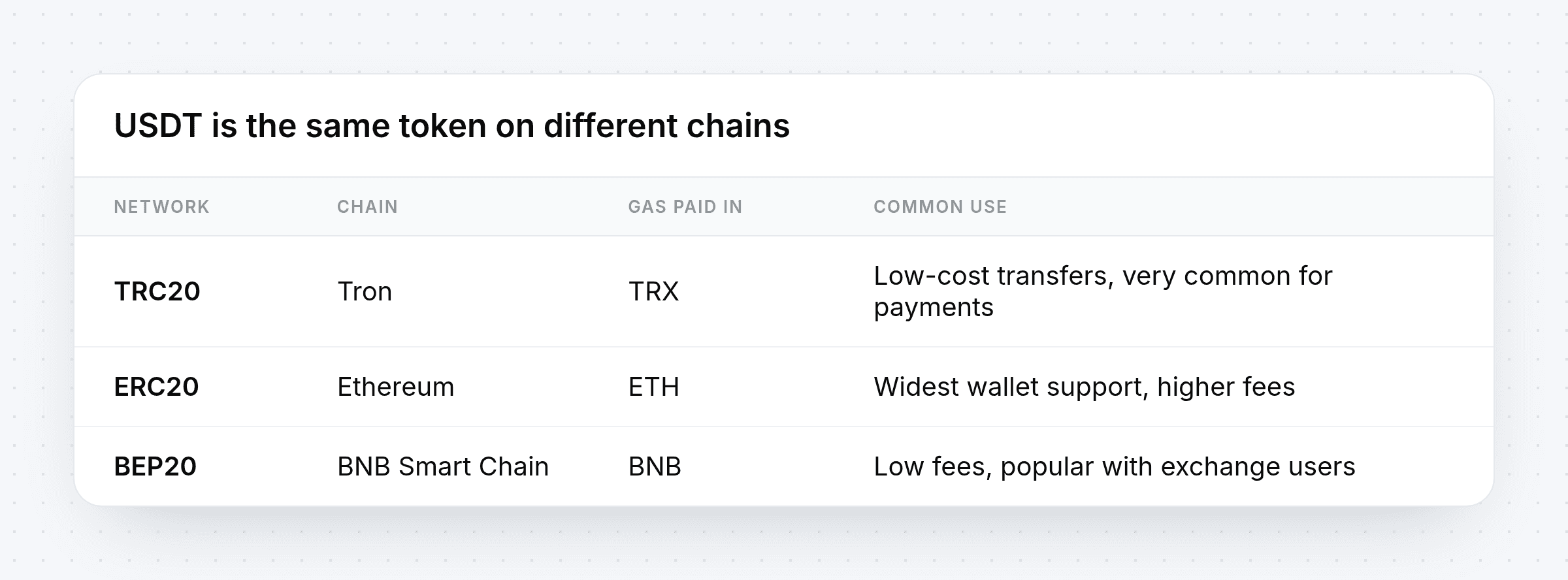
There is no single "best" network. The right one is the network your customer's wallet or exchange already supports, which is why a checkout should let the customer choose.
The wrong-network problem
A USDT address on one chain is not automatically valid on another. If an invoice expects USDT on TRC20 and the customer withdraws from an exchange on a different network, the funds do not arrive where your checkout is looking. These are the payments that turn into long support threads.
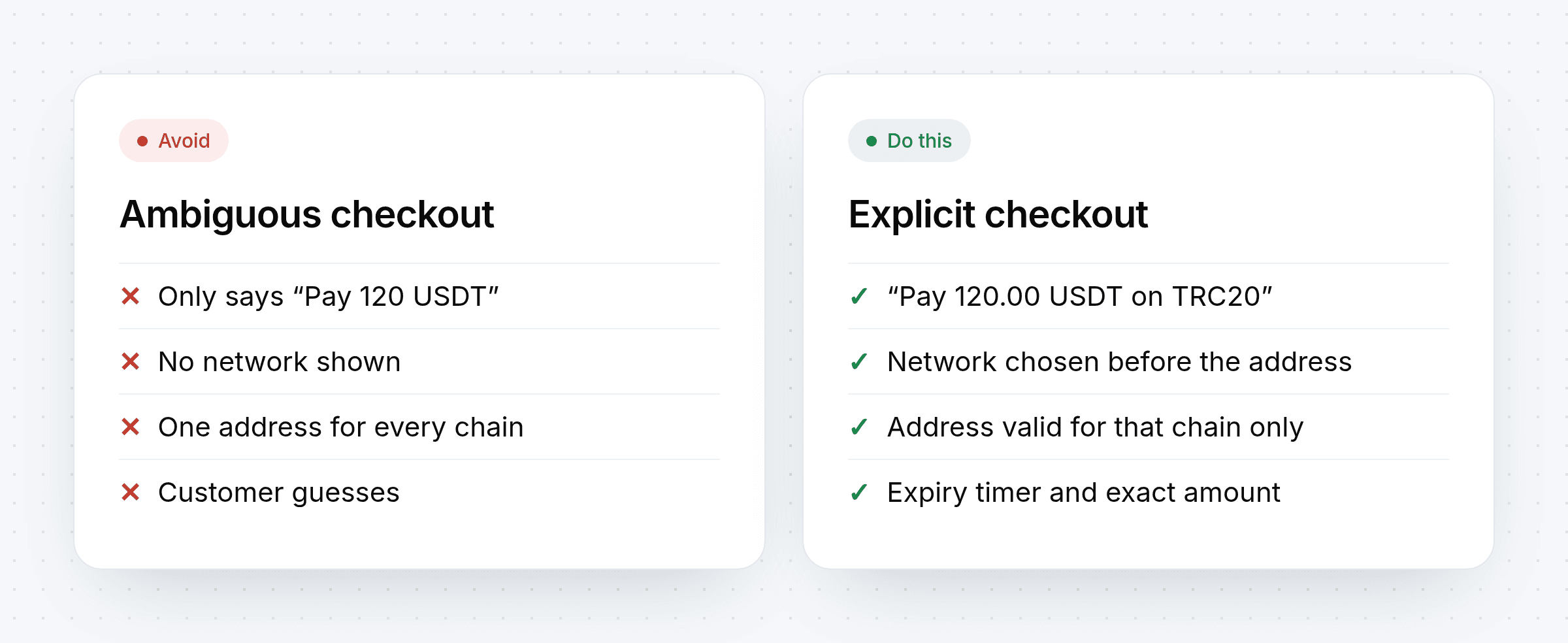
The fix is a checkout that removes ambiguity:
Ask for the network first. The customer picks TRC20, ERC20 or BEP20 before any address is shown.
Show the network next to the amount. "Pay 120.00 USDT on TRC20", never just "Pay 120 USDT".
Issue an address for that network only. The invoice watches the chain it was created for.
Show an expiry timer. The amount is valid for a limited window.
How to accept USDT payments, step by step
1. Choose how customers will pay
Decide where USDT should appear: on your storefront checkout, on payment links you send in chat, or in a checkout widget embedded on your own website. With PapelShip all three use the same invoices underneath.
2. Enable USDT and its networks
Turn on USDT in your payment settings. PapelShip's checkout lets the customer pick the network for stablecoins, while native coins such as BTC or LTC always use their own chain.
3. Price in your currency
Keep your prices in USD or your local currency. When the customer chooses USDT, the invoice converts the price, locks the quote and shows the exact amount.
4. Let confirmations do their job
After the customer sends the payment, the invoice moves to payment processing and waits for the required confirmations on that network. Only then does it complete and release the order.
5. Handle short payments gracefully
Some wallets and exchanges subtract their withdrawal fee from the amount sent, so the payment arrives slightly short. A partial-payment state with the remaining balance lets the customer top up the same invoice instead of starting over.
6. Automate fulfilment
When the invoice completes, deliver the product automatically: a license key, a download or an account upgrade through a webhook. The faster the delivery, the fewer "did my payment go through?" emails you get.
Where your USDT actually lives
Received USDT credits your merchant-encrypted cold wallet on PapelShip's cold-storage infrastructure. The wallet's extended private key is encrypted with a password you set — only you can decrypt it, which means only you can spend. PapelShip holds the ciphertext; we don't have the authority to move your funds, freeze them, or lose them in an exchange-style failure. You get the convenience of managed infrastructure with the sovereignty of merchant-controlled keys.
USDT payment checklist
Check | Why |
|---|---|
Network selected before address | Prevents wrong-chain transfers |
Exact amount with two decimals | Avoids rounding disputes |
Visible expiry | Keeps quotes fresh |
Partial-payment handling | Recovers fee-deducted transfers |
Confirmation tracking | Releases orders only when final |
Webhook on completion | Automates delivery |
Merchant-controlled wallet encryption | Only you can spend |
PapelShip+ for 0% platform fee | You keep 100% of USDT received |
Common mistakes
Posting one wallet address in a Discord channel. You cannot match payments to customers, and you cannot tell which network they used.
Asking customers to send a screenshot. Screenshots prove nothing; the blockchain does.
Releasing on the first sighting of a transaction. Wait for confirmations.
Forgetting the gas token. Each network charges fees in its own coin, which matters when you move funds later.
Using a custodial processor that can freeze your USDT. Prefer merchant-controlled encryption.
Explore Crypto POS How processing works Card + crypto checkout
Frequently asked questions
Which USDT network is cheapest?
TRC20 and BEP20 are typically much cheaper per transfer than ERC20, but fees change with network demand. Let customers pay on the network their wallet supports.
Can I accept USDC the same way?
Yes. USDC is also multi-chain, and the same rules apply: choose the network first, then pay the exact amount.
What if a customer sends USDT on the wrong network?
The invoice will not see the payment on the chain it is watching. Contact the customer with the transaction hash; recovery depends on the networks and wallets involved, which is why prevention at checkout matters.
Where does the USDT go after payment?
In PapelShip, completed payments credit your merchant-encrypted cold wallet. You withdraw to the address you choose whenever you want — and only you can, because only you hold the password that decrypts the wallet.
What is the fee on USDT with PapelShip?
Standard plans charge a modest platform fee per transaction (see pricing). PapelShip+ removes it entirely — 0% on all USDT payments, with only the blockchain network fee passed through at cost on withdrawals.
Start accepting USDT
USDT is the easiest way to give international customers a stable, card-free way to pay. With network selection, locked quotes and automatic confirmations, it can be as hands-off as a card payment — and on PapelShip+ you keep 100% of every USDT received.


