Software licensing
What Is HWID Locking? Hardware-Bound Licenses for C++ & C# DRM
HWID locking is a cornerstone of modern software DRM. How hardware IDs bind a license to one PC, why validation must be server-side, and how qPapel Auth implements it for C++ and C#.
You sell one license. A week later the same key is running on thirty computers because it was posted in a group chat. This is the most common way paid software loses revenue, and the most common defence against it is an HWID lock.
This article explains what HWID locking is, how a hardware ID is produced and checked, where naive implementations go wrong and how to handle legitimate device changes without punishing honest customers.
What is HWID locking?
HWID stands for hardware ID: a fingerprint derived from characteristics of the machine a program runs on. HWID locking (also called hardware binding or node locking) means a license key is tied to the hardware ID of the first device that activates it. After that, the key only works on that device.
The goal is not to make sharing impossible in theory. It is to make sharing a key with someone else stop working in practice, without making life harder for the person who paid.
How an HWID lock works
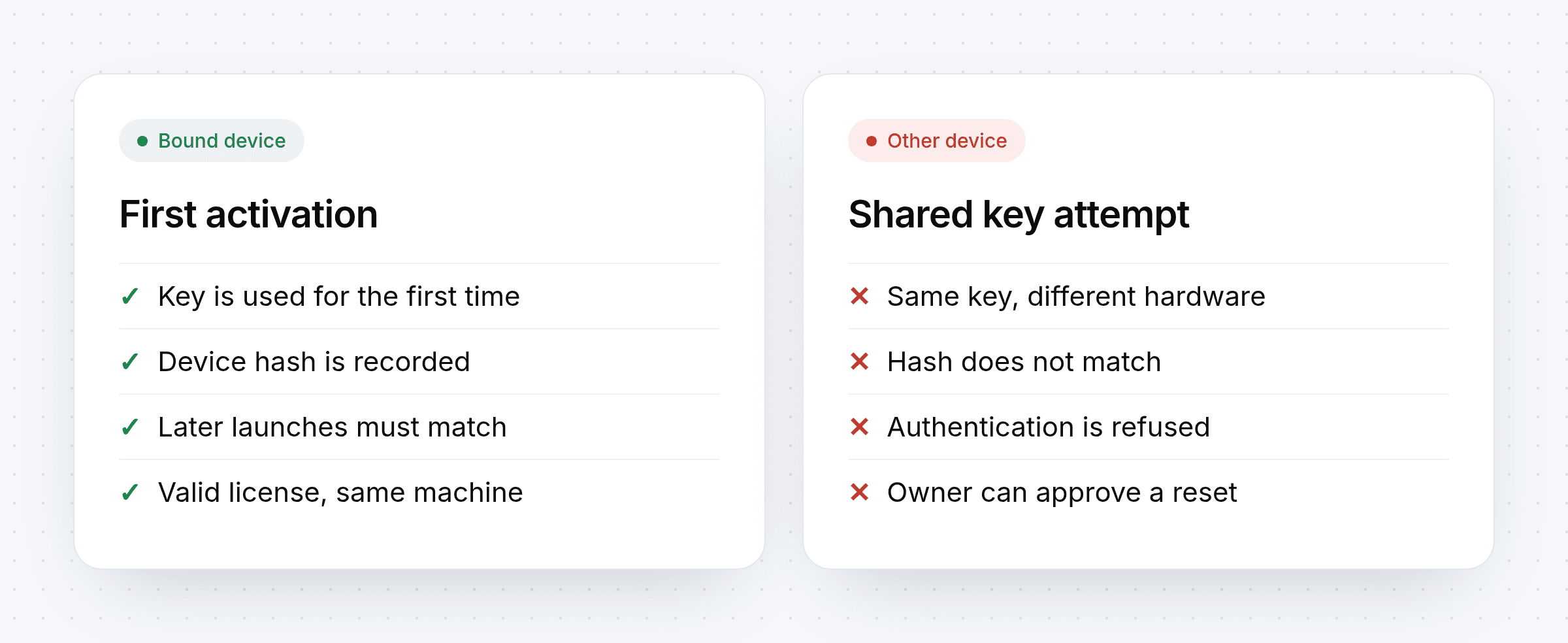
First activation. The customer enters their key. The application computes a hardware fingerprint and sends it with the key to the licensing server.
Binding. The server sees an unused key, records the fingerprint and marks the key as bound.
Every later launch. The application sends the key and fingerprint again. If they match the stored binding, the session is allowed.
A different machine. The same key arrives with a different fingerprint. The server refuses it, and the attempt can be logged.
Why the check must happen on the server
The weakest HWID locks keep the binding on the customer's machine, in a file or registry entry, and compare locally. Anything stored and compared locally can be edited or patched. A meaningful HWID lock needs three things:
The binding lives on the server. The client never decides whether it is the right machine.
The channel is protected. Requests and responses are encrypted and signed, so an attacker can't fake a "valid" reply or replay an old one.
Something valuable depends on the result. If the app only shows a nag screen on failure, it will be patched out. If configuration, strings or files are delivered only after a successful check, there is nothing useful to run without one.
qPapel Auth is built this way: the session starts with a key exchange, traffic is encrypted and signed, the key and device are checked server-side, and server-side variables and files are released only to an authenticated license.
What makes a good hardware fingerprint
A fingerprint has to balance two goals that pull in opposite directions:
Goal | Risk if you overdo it |
|---|---|
Unique per machine | Trivial changes (a new USB device, a driver update) break the binding |
Stable over time | Too few inputs, and different machines look the same |
Good fingerprints rely on components that rarely change and combine several of them, so a single hardware swap doesn't immediately lock the customer out.
Handling HWID resets
Honest customers change hardware. They upgrade a motherboard, reinstall Windows or move to a new laptop. How you handle this decides whether HWID locking feels fair or hostile.
Make resets easy to request. Let customers ask for a reset themselves instead of opening a ticket.
Approve quickly. A same-day reset turns a frustrated customer back into a happy one.
Use bulk resets when needed. After a widespread Windows update or a fingerprint change in your own app, reset many keys at once.
Watch for patterns. One reset a year is normal. Weekly resets on the same key usually mean sharing.
HWID locking and other controls
HWID binding works best as one layer of several:
Key bans stop a leaked key everywhere at once.
Device management shows which computers use which keys, and lets you ban a device.
Process and window blacklists stop known cracking and debugging tools while your app runs.
Runtime analysis with qPAnalyzer flags unknown tools that try to inspect your application.
qPapel Auth Key management Sell licenses online
Frequently asked questions
Is HWID locking the same as DRM?
It is one component of DRM. HWID locking answers "which machine may use this license"; DRM as a whole also covers protecting the code and assets themselves.
Can a virtual machine bypass an HWID lock?
A VM produces its own fingerprint, so copying a key into a VM doesn't reuse the original binding. Server-side checks and runtime analysis also help detect suspicious environments.
Will HWID locking annoy paying customers?
Only if resets are slow or hidden. With self-service reset requests and quick approval, most customers never notice the lock exists.
Can one license cover several machines?
Yes. Device limits are a product decision; some licenses allow one device, others several.
Stop key sharing without hurting honest buyers
An HWID lock that is checked on the server, protected in transit and paired with fair resets is one of the highest-return protections a software seller can add.


