Digital products make some of the best businesses to run online. There is no warehouse, no shipping and no stock that goes out of date, and a sale at 3 a.m. costs you nothing to fulfil. To sell digital products online well, though, you still need what any shop needs: a place to sell, a way to get paid, a reliable way to hand over the goods and someone to help when something goes wrong.
This guide covers all of it, in the order you will meet it: what you can sell, how to choose a storefront and theme, how to price, how to take card and crypto payments, how automatic delivery works, how to support customers and the fraud basics every digital seller needs. Each section links to a deeper guide when you want more.
What digital products can you sell online?
Almost anything that can be delivered as a code, a file or access can be sold online. What matters for your setup is how each type is delivered, because that decides your product settings, your support load and your fraud risk.
| Product type | Examples | How it's delivered |
|---|---|---|
| License keys | Software, plugins, tools | Key generated per order or taken from stock |
| Game keys and gift cards | Steam keys, wallet codes, DLC | Code from your stock, per variant |
| Files | Templates, presets, e-books, installers | Download link, available only to buyers |
| Subscriptions | Software access, premium content | Recurring billing, optional trial |
| Memberships | Private Discord servers and communities | A Discord role per product variant |
| Services | Setup, coaching, custom work | Order details and a support ticket |
| Donations | Tips, open-source support | A pay-what-you-want product |
Many stores mix types. A software seller might offer a lifetime license, a monthly subscription and a paid setup call; a creator might sell a preset pack, run a paid community and accept donations. PapelShip products can be single items, products with variants (each with its own price and delivery settings) or donations, and delivery can be a file download, a license key or a recurring subscription.
Subscriptions deserve a note. Billing can be daily, weekly, monthly or yearly, with a separate initial price and recurring price, a trial period and auto-renew. That lets you run a discounted first month or a free week without workarounds. Before you list anything, check that it is allowed: every platform has rules about what can be sold, and ours are in the acceptable use policy.
How to choose a storefront and theme for digital products
There are three ways to put digital products in front of buyers, and you can combine them:
- A hosted storefront on your own domain, with SSL set up for you. Best when you have several products and want buyers to browse.
- A checkout widget on a site you already have, so buyers pay without leaving it. See how to add a checkout widget to your website.
- A link-in-bio page for creators who sell through social media. The Bioplus theme puts your profile, links and a quick-buy window on one page.
If you choose a storefront, start from a theme designed for your product type. Digital themes are built around instant delivery: the moment a payment confirms, the code, license or file appears on the order page and arrives by email.
| Theme | Best for |
|---|---|
| Keystone | Game keys, accounts and gift cards |
| Vanguard | Premium digital products and memberships |
| Arsenal | Dense gaming catalogues with a Discord community |
| Circuit | Technology brands selling software and licenses |
| ShipFlow | SaaS-style software and digital services |
| MarketPro | Large, multi-category digital catalogues |
| Ship | A handful of products, with checkout on the page |
| Obsidian | Full control in code with Liquid templates |
Every theme includes a visual editor, a cart with discount codes and a single-page checkout, a customer portal, multiple languages and currencies, verified buyer reviews, and layouts designed separately for phone, tablet and desktop. Compare them side by side in the theme gallery.
In the store builder you click any section, text, card or button to select it and edit it in place, reorder or hide blocks, and set the title, URL, meta description and social image for every page. Version history keeps automatic and named snapshots, and a setup checklist shows what is left before launch. If you would rather describe changes than make them, PapelAI can make them with your approval.
- 01
Pick a theme
Choose one built for your product type and preview it with your own logo and colours.
- 02
Add products and variants
Create each product with its variants, prices and delivery: key, file or subscription.
- 03
Connect payments
Set up a card gateway, your crypto wallet and any local methods your buyers need.
- 04
Connect your domain
Point your own domain at the store; SSL is set up for you.
- 05
Place a test order
Buy your cheapest product with each payment method and check delivery on screen and by email.
How to price digital products
Pricing is where many new sellers either undercharge or overcomplicate. There are no universal numbers, but a few principles hold for almost every digital product:
- Offer tiers, not one price. Two or three variants, such as basic, pro and lifetime, let buyers choose, and the top tier makes the middle one look reasonable.
- Use duration as a lever. For keys and access, short and long periods at different prices give buyers an easy first step. A 30-day key is a low-risk first purchase; lifetime suits committed buyers.
- Lower the first step for subscriptions. A trial period or a lower initial price reduces the risk of trying, while the recurring price reflects ongoing value.
- Use discounts deliberately. Discount codes work well for launches, communities and returning buyers. A permanent discount just becomes the real price.
- Account for payment costs. If one method costs you more to handle, payment method fees can be set per store, product or variant instead of raising every price.
- Show local prices. Prices in each visitor's currency remove a mental conversion step, and stores can be translated into every language you sell in.
Whatever you choose, test it. Change one thing at a time and give it a few weeks before you decide whether it worked. Your own sales data is a better guide than any rule of thumb.
How to accept payments for digital goods: card, crypto and local methods
Digital buyers are international by default, and no single payment method reaches all of them. Cards are familiar but are sometimes declined for cross-border digital purchases. Crypto reaches buyers without a usable card. Local methods such as bank transfer are everyday habits in many countries. A good checkout offers several:
- Cards through a connected gateway such as Stripe, PayTR or iyzico.
- Crypto, including BTC, ETH, LTC, SOL, USDT and USDC, paid straight to your own wallet. The checkout shows a QR code, copy buttons and live payment status.
- Custom methods such as bank transfer and gift cards, with instructions, reference numbers, optional payment proof and country restrictions. See how to accept bank transfer and gift card payments.
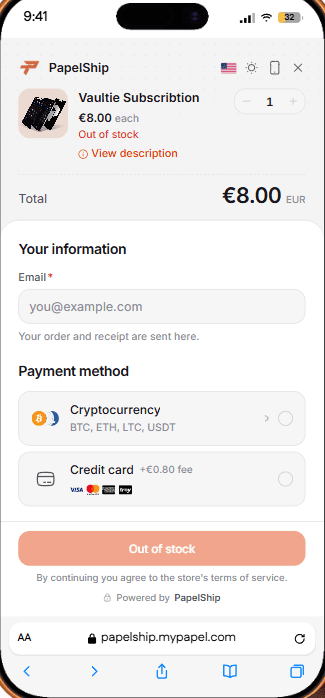
How many methods should you offer? Start with cards and crypto, then add a local method when you see demand from a particular country, such as many visitors from one market leaving at checkout. Each method should earn its place: a long list of rarely used options makes the checkout harder to scan, not easier. Payment method visibility is set in the invoice builder, so a method can be hidden where it doesn't fit.
How automatic delivery works for digital products
Automatic delivery is the core promise of digital goods: the buyer pays and receives the product immediately, at any hour, without you. It is also the part that breaks most visibly when it is done by hand.
- 01
Order placed
Buyer checks out
- 02
Payment confirmed
Cards at once, crypto on-chain
- 03
Item assigned
Key, file, role or license
- 04
Delivered
Order page and email
- 05
Customer portal
Find it again later
A few details make delivery dependable rather than merely fast:
- Stock per variant. For keys and codes you hold, the Stock page shows stock per product and variant, days of cover and a needs-attention filter, so you restock before you run out.
- Waiting orders fill themselves. If a variant does run out, keys you add later are delivered automatically to the orders still waiting.
- Downloads only for buyers. Paid files are available only to people who bought them, not to anyone who has the link.
- Roles for memberships. Discord roles can be set per product variant and granted on purchase. See Discord roles for digital products.
- Licenses for software. For software you build, qPapel Auth generates a license per order and locks it to the buyer's hardware on first launch. How to sell software licenses online covers that path.
Customer support and the customer portal
Digital products generate fewer support requests than physical ones, but the ones they do generate are urgent: "I paid and didn't get it", "my code doesn't work", "I lost my download". The fastest support is the kind customers never have to ask for.
Every PapelShip theme includes a customer portal where buyers follow their orders, subscriptions, reviews and support tickets in one place. When they do need help, support tickets include an order summary, so you see what they bought without asking, and closed tickets can be reopened instead of starting over. Emails carry your store's branding.
On your side, the Customers page lists every buyer with their spend, orders and linked Discord accounts, with search and sorting. For software, a dedicated customer panel lets buyers check a license's status, remaining time and HWID lock, and request a reset themselves.
Write down your delivery and refund policy before launch and link it from your footer and checkout. Digital purchases can't really be returned, so say plainly when you refund (a key that never worked, a corrupt file) and when you don't (a change of mind after a key has been revealed). Consumer rules differ by country, so check what applies where you sell. A clear policy prevents most disputes and gives you something to point to if one turns into a chargeback.
Fraud prevention basics for digital sellers
Digital goods attract fraud for the same reasons they are good to sell: they are delivered instantly, they can be resold, and there is no shipping address to check. Stolen cards, chargebacks and account abuse show up sooner or later in every digital store. You don't need to be suspicious of every buyer, but you do need a few layers in place before launch.
Product security rules
Block VPN and proxy, cap purchases
Invoice risk analysis
Proxy, VPN, TOR and data centre checks
Confirmed payments only
Deliver after the payment clears
Customer blacklists
Stop repeat abusers
Buyer-only access
Files and keys tied to the order
Each PapelShip invoice carries a risk level and checks for proxy, VPN, TOR, hosting or data centre connections, mobile networks, anonymity, abuse risk and iCloud Relay, alongside the ISP, ASN, region and timezone. Use them to decide which orders deserve a second look, and apply the strictest product rules only to the products most often targeted, so honest buyers of everything else see no friction. Fraud prevention for digital goods goes deeper.
よくある質問
Start small, automate early
The sellers who do well with digital products rarely start with the biggest catalogue. They start with one product, a theme that fits it, two or three payment methods and delivery that runs on its own, then add products, languages and channels as buyers show them what works.
Set up the basics in this guide once, place a test order with every payment method, and your store can sell while you sleep.
PapelShipコマースチーム
ストアフロントとオンライン販売